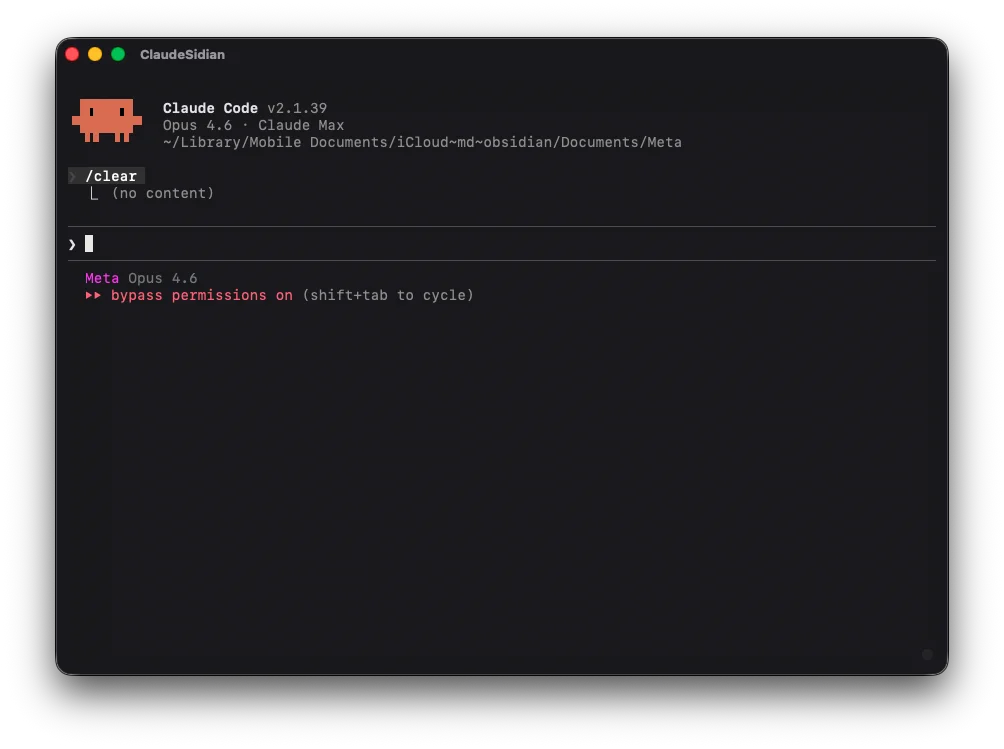
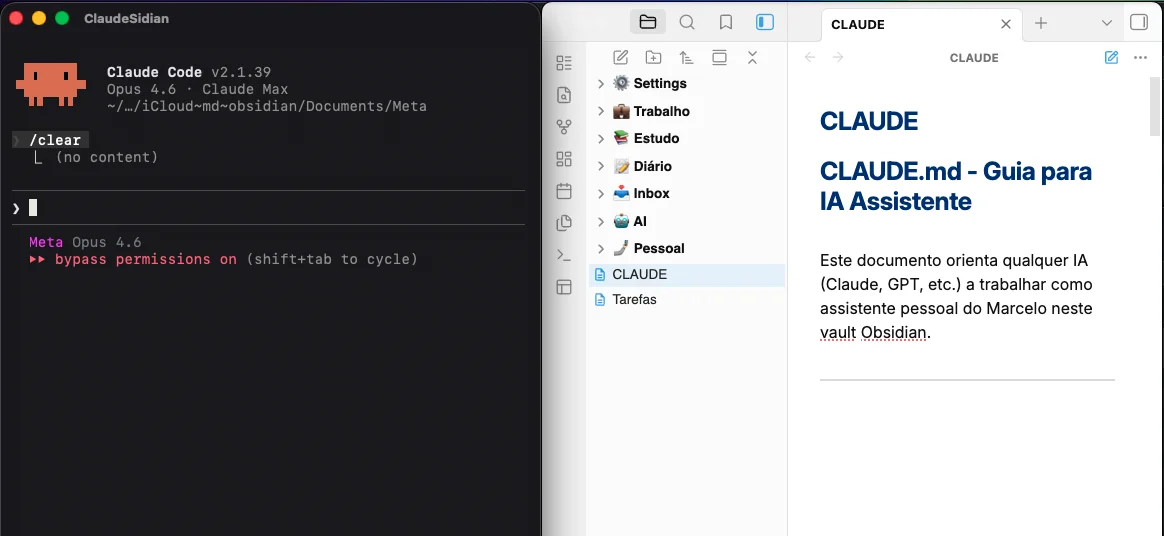
I wanted something simple: a dedicated app for using Claude CodeClaude Code Anthropic's command-line tool. You build software by talking to AI right in the terminal — it reads your code, edits files, and runs tests. inside my ObsidianObsidian A notes app that works like a second brain. You write in Markdown, connect ideas with bidirectional links, and everything stays local on your computer.. Open it, already be in the right folder, without mixing it up with the other twenty tabs in iTerm2iTerm2 The favorite terminal for devs on macOS. More powerful than the default Terminal.app — with tabs, split panes, and addictive shortcuts. Free and open source.. One click and done — Claude Code right there, focused, ready to take notes with me.
What happened over the next few hours reminded me why I still get excited about technology after writing software since 2010. In a single work session, I built a native, macOSmacOS The operating system on Apple's computers (MacBook, iMac, Mac Mini). Different from iOS, which runs on iPhones. application that's open sourceOpen Source Software with open code — anyone can view, copy, modify, and distribute it. It's the opposite of proprietary software, where the code is secret. and distributed via GitHubGitHub The world's largest platform for hosting and sharing code. It works like a social network for developers, where projects get published and collaboration happens. — and I didn't write a single line of code by hand. I did it all by talking to an AI.
This is the story of ClaudeSidian.
The problem: mixed-up context
Anyone who works with a terminalTerminal A window where you type text commands to control the computer, instead of clicking buttons and menus. Developers use it all the time. knows how it goes. You open iTerm2 and you already have twelve tabs — a project here, a server there, an SSH session somewhere. Now imagine adding one more tab for Claude Code, which needs to stay open all the time in your Obsidian vaultVault In Obsidian, a "vault" is the folder on your computer where all your notes live. Markdown files, no mandatory cloud. You own your data.. Within five minutes it gets lost among all the others.
What I wanted was context separation. An app just for this: open it, already be in the right directory, and have Claude Code as my day-to-day notes assistant. No typing cd ~/obsidian-vault every time. No confusing tabs. No friction.
It seemed simple. And it should have been.
The first attempt: the shortcut that almost worked
I did what any pragmatic developer would do: the minimum viable thing. I asked Claude Code to create a wrapperWrapper A program that "wraps" another one. Instead of running directly, the wrapper sets up the environment and then calls the real program behind the scenes. — an app that, behind the scenes, told Terminal.app to run the right command in the right folder. A few-line script wrapped in a macOS app structure.
It worked. Claude Code opened, the environment loaded, everything ran. Until I hit Cmd+Tab.
The icon that showed up was Terminal.app's. Not my app's. The window was generic, with no personality — visually it looked like any other terminal session. Because, in practice, I hadn't created an application — I'd created a fancy shortcut. And shortcuts have no identity.
The question that changed everything
I went back to the conversation with Claude Code and asked the obvious question: how do I get my own icon in Cmd+Tab? It sounds like an aesthetic issue, but it was about something more fundamental — about the app existing as a first-class citizen in the operating system.
The answer took some research. There were three paths: use ElectronElectron A framework that lets you build desktop apps using web technologies (HTML, CSS, JavaScript). Powerful, but each app ships an entire browser inside it — which weighs a lot. (too heavy), build a terminal from scratch in SwiftSwift The programming language Apple created to build apps for the iPhone, Mac, and other Apple platforms. Modern, fast, and safe. (too complex), or use a library called SwiftTermSwiftTerm An open source library that emulates a terminal inside Swift apps. Native, lightweight (under 2MB), with full support for colors and interactivity. — a native, mature terminal emulator under 2MB. Claude Code weighed the options, explained the tradeoffs, and recommended SwiftTerm.
I agreed. And within minutes, the conversation produced a completely different application: a native Swift app, with its own window, an icon in the DockDock The bar of icons at the bottom (or side) of the Mac's screen. It's where the shortcuts to your favorite apps live., an integrated terminal, full support for colors and interactivity. All in 1.4MB.
The details that only show up in real use
Here's where the story gets honest. The app worked, but actually using it revealed a series of problems that no amount of planning would have predicted:
Cmd+Wdidn't close the window. The terminal component captured the keyboard event before the system could process it. It needed a specific fix in the macOS event chain.- The window title changed on its own. Claude Code updates the terminal title as you interact with it. I had to lock the title to keep the app's identity.
Shift+Enterdidn't work. Claude Code uses that combination for multi-line input. SwiftTerm didn't know what to do with it. It needed a custom subclass that intercepted the key and sent the right signal.- Accents didn't work. I couldn't type "ã", "é", "ç". A default setting in the library was intercepting the Option key, breaking the macOS character composition mechanism. A problem that only affects people who write in Portuguese — and one most English-speakingEnglish-speaking People who speak English as their native language. Most development libraries and tools are built by — and for — this audience. developers would never run into.
Each problem was solved in the same conversation. I'd describe what was happening, Claude Code would investigate, propose a solution, I'd test it, and we'd move on. The loop between "this doesn't work" and "now it works" was minutes, not hours.
AI didn't replace the engineering. It sped up the feedback loop between having an idea and seeing it work. I'm still the one driving.
From personal project to open source
Up to that point, everything was hardcodedHardcoded When a value is fixed directly in the code, instead of being configurable. It works for whoever wrote it, but breaks for anyone else.: the command, the directory, the binary path. It worked for me, but for no one else. I decided to open the code.
That required a significant refactor. I asked Claude Code to make everything configurable: a config file, a first-run wizard with a graphical interface, a preferences menu accessible via Cmd+,. The app needed to work for anyone, not just for me.
Beyond the code came all the artifacts an open source project needs: a READMEREADME The calling card of a software project. A text file that explains what the project does, how to install it, and how to use it. It's the first thing anyone reads on GitHub., a CHANGELOGCHANGELOG A chronological record of every change in the project — what was added, fixed, or removed in each version. A diary of the software., an MIT licenseMIT License One of the most permissive open source licenses. It basically says: "use it however you want, just keep the credit." Simple, no red tape., a build script. And most importantly: a CI/CD pipelineCI/CD Continuous integration and delivery. An automated robot that, with each change to the code, compiles, tests, and prepares a new version for download — with no manual intervention. on GitHub Actions that automatically builds a universal binary (Apple Silicon and Intel) with every new version.
The first release failed. The CI environment used a different Swift version than my machine. A classic "works on my machine" — solved by switching the runner version. The second release worked.
What this teaches about AI and building products
I don't want to romanticize it. Claude Code didn't "create" ClaudeSidian. I did. The AI was the tool — extraordinarily capable, but a tool. Every design decision, every "this isn't good enough" moment, every prioritization came from years of experience knowing what matters and what's noise.
What the AI changed was the speed of materialization. Ideas that would take days to prototype became real in hours. And that changes the math on what's worth trying.
A few lessons that stuck with me:
- The quality of the question determines the quality of the answer. Knowing what to ask requires knowing the territory. My familiarity with macOS, the terminal, and software engineering let me ask precise questions. AI amplifies competence — it doesn't replace it.
- The process is iterative, not magic. It took six versions, dozens of back-and-forths, unexpected bugs. Talking to the AI feels more like pair programmingPair Programming A practice where two developers work together on the same code: one writes while the other reviews in real time. Multiplies quality and reduces errors. than consulting an oracle.
- Shipping is the hard part. Getting it working on your machine is 30% of the job. Configuration, distribution, CI/CD, documentation — all of that is real work the AI also helps with, but that someone has to drive.
- Bugs are teachers. The accent problem only existed because I write in Portuguese. Shift+Enter only mattered because I actually use Claude Code. You only discover these problems by using what you built.
Deep roots, new fruit
ClaudeSidian is a small app. Three Swift files, one dependency, 1.4MB. But it captures something I deeply believe: the best way to understand a technology is to build something real with it.
At Cajueiro.tech Labs, that's exactly what we do. We don't write about AI in the abstract — we build products, push limits, publish code. Every project is a living learning lab that feeds our mentoring.
ClaudeSidian is available as open source on GitHub. If you use Claude Code on macOS, maybe it scratches the same itch it scratched for me.
And if you're thinking about how AI can speed up building your own products — let's talk.

Want to turn your idea into a product?
Talk to me about how AI can speed up your results.
Let's talk