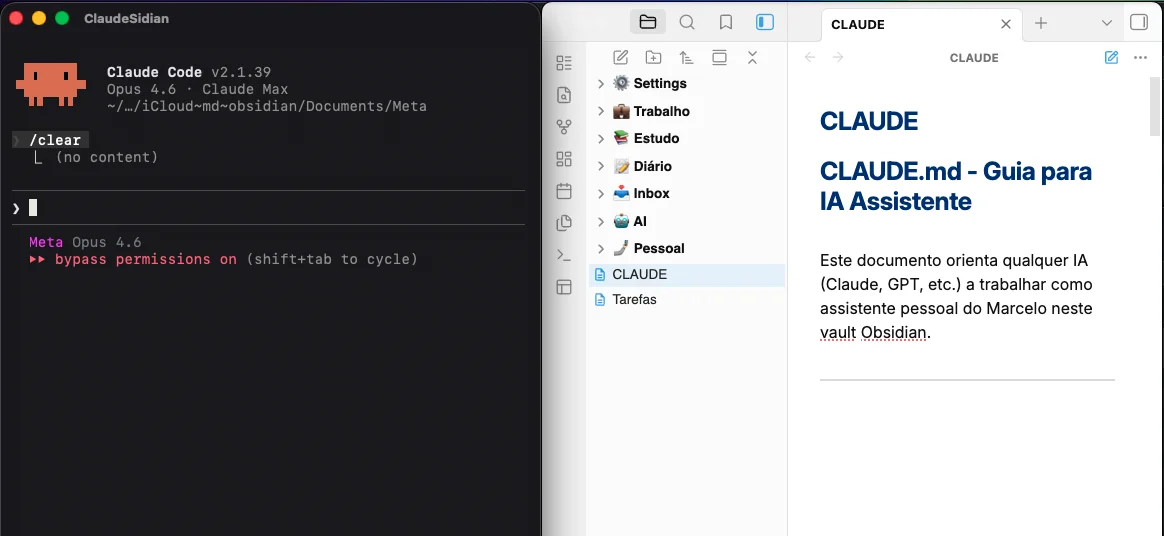
I have ADHDADHD Attention-Deficit/Hyperactivity Disorder. It affects focus, organization, and working memory. The mind jumps between ideas — great for creating, terrible for documenting., I lead engineering, I run businesses, and my head works faster than my fingers can type. For years, I tried to keep organized notes. I bought into the "second brain" idea, installed ObsidianObsidian A notes app that works like a second brain. You write in Markdown, connect ideas with bidirectional links, and everything stays local on your computer., created folders, set up plugins. At first, I used it with enthusiasm — I spent time writing, organizing, tweaking.
But the friction kept killing the habit. And within a few weeks, it turned into a dumping ground for loose notes.
Until I put an AI inside my vaultVault In Obsidian, a "vault" is the folder on your computer where all your notes live. Markdown files, no mandatory cloud. You own your data. — and everything changed.
Obsidian in 30 seconds
Obsidian is a notes app built on MarkdownMarkdown A plain-text format that uses symbols like # for headings and ** for bold. Readable by humans and by any text editor — no dependence on specific software.. Unlike Notion or Evernote, your files are yours — plain .md files on your computer, synced however you like.
What makes it special:
- Local-first: your data stays on your device. You own it.
- Bidirectional links:
[[Note Name]]creates connections between ideas, forming a web of knowledge. - Powerful plugins: hundreds of them — from KanbanKanban A visual organization method with cards in columns (like "To Do," "Doing," "Done"). Popularized by Trello. boards to knowledge graphs.
- Pure Markdown: if you ever want to leave, your files stay readable in any editor.
- Free for personal use.
The "second brain" concept — popularized by Tiago Forte — fits perfectly: you externalize your thoughts to a reliable system, freeing your mind for what matters. Creating, deciding, executing.
Claude Code: the AI that touches your files
Claude Code is Anthropic's command-lineCommand line (CLI) A way to use your computer by typing text commands instead of clicking buttons. It looks like hacker stuff, but it's the fastest way to automate tasks. tool. It runs in the terminalTerminal A window where you type text commands to control the computer, instead of clicking buttons and menus. Developers use it all the time. and has access to your computer's file system. It reads, creates, edits, and organizes files on disk.
In practice: you type claude, and you talk to an AI that:
- Reads your files — analyzes anything on your computer
- Edits and creates — writes code, text, documentation
- Runs commands — executes scripts, makes git commitsGit commit Saving a "snapshot" of your project's current state. Git is the most widely used version control system in the world — it lets you go back in time and collaborate without stepping on each other's work.
- Keeps context — understands persistent instructions via
CLAUDE.md
Claude Code was designed for programmers. But here's the clever part: if it can manipulate any file on the computer, it can manage an Obsidian vault.
That's exactly what I did.
The problem: ADHD vs. an organized vault
The cycle was always the same. I'd start out excited — I'd create pretty folders, think through taxonomies, configure pluginsPlugins Extensions that add features to a piece of software. In Obsidian there are hundreds — from task management to graphs of the connections between notes.. In the first few weeks, I'd write, organize, put in the time. But when the routine got tight, the friction won.
When you have ADHD, the barrier between "having an idea" and "documenting that idea in a structured way" is enormous. You're in a rush, thinking about a thousand things, solving problems — and then you have to stop everything, open Obsidian, create a file in the right folder, with the right name, with the right tags.
The habit kept dying. Everything started going into the Inbox. Before long, more than 50 notes dumped there, with no context, no organization. And dealing with it by hand was so tedious that I simply... didn't.
My "second brain" was a dumping ground for abandoned good intentions.
The turning point: the AI adapts to me
The solution came when I realized Claude Code could access my Markdown files directly. Instead of me adapting to the system, I adapted the system to me.
The logic is simple:
- I speak in an unstructured way. Loose thoughts, ideas, bits of information.
- The AI organizes. It knows where each thing goes, which format to use, which tags to apply.
For this to work, I created a CLAUDE.md at the root of the vault. That file is read automatically by Claude Code at the start of any conversation. In it, I documented:
- Who I am — personal and professional context
- Vault structure — folders, conventions, naming
- Organization rules — date format, tags, links
- Custom shortcuts — short commands the AI runs
- Task management — priorities, dates, sections
- Ventures — a table of projects with status, stackStack The set of technologies used in a project. For example: "my stack is React + Node.js + PostgreSQL." It's the developer's "toolkit.", and domains
It's like hiring an assistant who memorized the instruction manual for my life.
In practice
Vault structure
Meta/
├── Work/                 → Professional life
├── Personal/             → Ventures, health, family
├── Study/                → Zettelkasten, courses, concepts
├── Journal/              → Daily journaling
├── AI/                   → AI prompts and configs
├── Inbox/                → Quick capture
├── Settings/             → Assets, templates, backups
├── Tasks.md              → Central task management
└── CLAUDE.md             → Instructions for the AI
Day-to-day shortcuts
Instead of opening Obsidian, navigating to the right folder and creating a note, I open the terminal and type:
Create a task:
Task: review client X's proposal, due Friday, high priorityThe AI identifies that it's work, high priority, and inserts it into the right section of Tasks.md with an automatic date.
See what's on for today:
What do I have for today?It analyzes deadlines and priorities and gives me a summary.
Log an idea:
Idea MyProject: feature X to improve UXGoes straight to the project's Ideas.md, the right section.
Log a reflection:
Reflection: I need to improve my time management in the morningsGoes to the journal with a date and standardized formatting.
See projects:
Projects?The AI scans every Card.md and gives me a unified view.
Task management
Tasks.md is my command center:
- Current Priorities — at most 3 to 5 immediate-focus items
- Work — organized by area
- Personal — health, family, personal development
- Ventures — each project with its own tasks
- Calendar — commitments with fixed dates
- Backlog — ideas with no urgency
- Archive — completed tasks
I use the Obsidian TasksObsidian Tasks A plugin that turns checklists into a full task-management system — with dates, priorities, filters, and automatic queries. plugin with priority emojis and dates. All handled by the AI when I ask.
Speaking instead of writing
One technique that supercharged everything: voice.
I open ChatGPTChatGPT OpenAI's AI assistant. Unlike Claude Code, it doesn't access your files — but it understands voice very well, which makes it great for transcribing thoughts., start saying everything on my mind — unstructured, with repetitions, with tangents — and then feed the text to Claude Code to organize into the vault.
This post was created that way. I opened the mic, talked for a few minutes, and had the AI turn the brainstorm into a draft. Then came several rounds of back-and-forth — adjusting the tone, reorganizing sections, cutting the fat — until we reached what you're reading.
For someone with ADHD, this is liberating. The barrier between thought and record practically disappears.
The CLAUDE.md: the brain behind the brain
The secret is in the CLAUDE.md. Over 700 lines documenting:
- About the user — personal and professional context
- Vault structure — every folder and what goes in each one
- Decision tree — a flowchart of "where to put" each piece of content
- Quick commands — custom shortcuts
- Project system — conventions for
Project.mdandCard.md - Task management — format, priorities, rules
- Ventures table — status, stack, domain
- General rules — language, dates, tags, internal links
With that level of detail, the AI doesn't have to guess anything.
The decision tree
Is it about work?
├── Yes → Work/
│   ├── Meeting? → Meetings/
│   ├── Specific person? → People Management/
│   ├── Technical? → Technical Documentation/
│   └── Planning? → Projects/
└── No
    ├── Study? → Study/
    ├── Reflection of the day? → Journal/
    ├── Venture? → Personal/Ventures/
    └── Not sure → Inbox/ (temporary!)
When I send something unstructured, the AI consults this tree and routes it correctly.
Beyond tasks
A few examples of what I do with this setup:
- 1-on-11-on-1 A one-on-one meeting between a manager and a report. A moment to give feedback, align expectations, and listen. Usually weekly or biweekly. notes with my team, following a standardized template
- Personal reflections and self-awareness insights
- Technical decisions documented with context and rationale
- Themed journals for different areas of life
- Content planning for projects and channels
- Bulk reorganization — I had the AI reorganize 50+ Inbox notes into the right folders
- Migrating projects between folder structures
And the best part: I don't need to open Obsidian for any of this. I do everything through the terminal. When I want to look at it, that's when I open the app — and everything is organized, with links and tags working.
Obsidian as a personal operating system
Over time, Obsidian stopped being a notes app. It became my personal operating system:
- Project manager: each venture with a
Card.md, metadata, status, and costs - Task manager:
Tasks.mdcentralizes everything with priorities and dates - Personal CRM: 1-on-1s, feedback, hiring
- Knowledge base: ZettelkastenZettelkasten A German "slip-box" method. You write one idea per note and connect it to others, forming a web that produces unexpected insights. Academics have used it for decades. with raw notes, sources, and syntheses
- Journal: journaling and self-awareness entries
- Ventures dashboard: a unified view of all projects
All queryable via AI. I ask "what's the status of my ventures?" and get a formatted table in seconds.
You don't have to use Claude Code
The concept — an AI with access to your file system to manage your vault — doesn't depend on a specific tool.
Command-line (CLI) tools
- Gemini CLI — From Google. Terminal, local files, Gemini models. Free and open sourceOpen Source Software with open code — anyone can view, copy, modify, and distribute it. It's the opposite of proprietary software, where the code is secret..
- OpenAI Codex CLI — From OpenAI. Uses GPT, with file-system access.
- Aider — Open source, multiple models (Claude, GPT, Gemini, local models). Popular among devs.
- OpenCode — Open source, 75+ AI providers.
- OpenClaw — Open source, terminal automation with multiple models.
Tools with an interface (IDEIDE An integrated development environment — a souped-up code editor with autocomplete, debugging, and extensions. Examples: VS Code, Cursor, Windsurf.)
- Cursor — A code editor with built-in AI. Works for Markdown too.
- Cline — A free, open source extension for VS CodeVS Code A free code editor from Microsoft. The most popular in the world among developers — lightweight, extensible, and with thousands of plugins..
- Continue.dev — An open source extension for VS Code, multiple models.
- Windsurf — An AI IDE from Codeium.
The core point: you need an AI with access to your file system. From there, you can build the same kind of system.
How to get started
1. Install Obsidian
Download it at obsidian.md. Create a vault. Don't worry about the perfect structure — you can reorganize later.
2. Install an AI CLI tool
Claude Code is my pick, but any alternative from the list works. What matters is that it can read and edit local files.
3. Create the instructions file — together with the AI
In Claude Code, it's the CLAUDE.md. In other tools the name changes. What matters is that the AI reads it on startup and knows how the vault works.
Important tip: you don't have to write this file on your own. Open the tool inside the vault and build it together — explain how you want to organize things, ask for suggestions, bounce ideas around. The AI writes its own instructions while you two talk.
4. Start simple
Don't build a complex system right away:
- One folder for Work
- One folder for Personal
- A Tasks file
- A few basic shortcuts (
Task:,Complete:,What do I have for today?)
5. Evolve organically
Over time, you notice patterns and create new rules. The system grows with you.
Deep roots, organized fruit
The Obsidian + AI combo solved a real problem: I had ideas and couldn't keep them organized. Now the flow is natural:
- I think (or speak).
- I send it to the AI in an unstructured way.
- The AI organizes it in the right place, in the right format.
- When I need it, I open Obsidian and it's all there.
For anyone with ADHD, anyone living in a rush, anyone juggling many projects at once — this approach removes the friction between thought and record. You externalize, the AI takes care of it, and you're free to do what you do best: think and create.
The future of personal productivity isn't about the perfect tool. It's about tools that adapt to you — not the other way around.
At Cajueiro.tech Labs, that's what we do: we test tools, build systems, and document what actually works. Every experiment feeds our mentoring with practical lessons — not theoretical ones.
If you want to build a system like this and don't know where to start — or you want to understand how AI can transform your team's productivity — let's talk.

Want to organize your life with AI?
Let's talk about building a productivity system that works for you.
Let's talk